Ctrl+K
DIPY

Site Navigation

    • Overview
    • Tutorials
    • Recipes
    • CLI / Workflows
    • API
    • CLI API
    • Upcoming

    • DIPY Workshop 2026
    • Past

    • DIPY Workshop 2025
    • DIPY Workshop 2024
    • DIPY Workshop 2023
    • DIPY Workshop 2022
    • DIPY Workshop 2021
    • DIPY Workshop 2020
    • DIPY Workshop 2019
    • News

    • Calendar
    • Newsletters
    • Blog
    • Youtube
    • Help

    • Github Discussions
    • Team
    • FAQ
    • Mission Statement
    • Releases
    • Cite
    • Glossary
  • GitHub
  • Twitter/X
  • YouTube
  • LinkedIn

Site Navigation

    • Overview
    • Tutorials
    • Recipes
    • CLI / Workflows
    • API
    • CLI API
    • Upcoming

    • DIPY Workshop 2026
    • Past

    • DIPY Workshop 2025
    • DIPY Workshop 2024
    • DIPY Workshop 2023
    • DIPY Workshop 2022
    • DIPY Workshop 2021
    • DIPY Workshop 2020
    • DIPY Workshop 2019
    • News

    • Calendar
    • Newsletters
    • Blog
    • Youtube
    • Help

    • Github Discussions
    • Team
    • FAQ
    • Mission Statement
    • Releases
    • Cite
    • Glossary
  • GitHub
  • Twitter/X
  • YouTube
  • LinkedIn

Section Navigation

  • Quick Start
    • Getting started with DIPY
    • Introduction to Basic Tracking
  • Preprocessing
    • Reslice diffusion datasets
    • Between-volumes Motion Correction on DWI datasets
    • Noise estimation using PIESNO
    • Denoise images using Non-Local Means (NLMEANS)
    • Patch2Self: Self-Supervised Denoising via Statistical Independence
    • Brain segmentation with median_otsu
    • Denoise images using Local PCA via empirical thresholds
    • Gradients and Spheres
    • Denoise images using Adaptive Soft Coefficient Matching (ASCM)
    • SNR estimation for Diffusion-Weighted Images
    • Denoise images using the Marcenko-Pastur PCA algorithm
    • Suppress Gibbs oscillations
    • Bias Field Correction for Diffusion MRI: a Practical Guide
  • Reconstruction
    • Applying positivity constraints to Q-space Trajectory Imaging (QTI+)
    • Reconstruct with Diffusion Spectrum Imaging (DSI)
    • Reconstruction of the diffusion signal with the correlation tensor model (CTI)
    • DSI Deconvolution (DSID) vs DSI
    • Calculate SHORE scalar maps
    • Reconstruct with Generalized Q-Sampling Imaging
    • Continuous and analytical diffusion signal modelling with 3D-SHORE
    • Reconstruct with Constant Solid Angle (Q-Ball)
    • Reconstruction with the Sparse Fascicle Model (SFM)
    • Calculate DSI-based scalar maps
    • Reconstruct with Q-space Trajectory Imaging (QTI)
    • Crossing invariant fiber response function with FORECAST model
    • K-fold cross-validation for model comparison
    • Reconstruction of the diffusion signal with DTI (single tensor) model
    • Local reconstruction using the Histological ResDNN
    • Reconstruction of the diffusion signal with the WMTI model (DKI-MICRO)
    • Using the RESTORE algorithm for robust tensor fitting
    • Using the free water elimination model to remove DTI free water contamination
    • Reconstruction of the diffusion signal with the kurtosis tensor model (DKI)
    • Reconstruction with FORCE (FORward modeling for Complex microstructure Estimation)
    • Signal Reconstruction Using Spherical Harmonics
    • Reconstruction with Multi-Shell Multi-Tissue CSD
    • Continuous and analytical diffusion signal modelling with MAP-MRI
    • Reconstruction with Constrained Spherical Deconvolution model (CSD)
    • Intravoxel incoherent motion (IVIM)
    • Reconstruction of Bingham Functions from ODFs
    • Robust fitting with iteratively reweighted least squares.
    • Mean signal diffusion kurtosis imaging (MSDKI)
    • Reconstruction with Robust and Unbiased Model-BAsed Spherical Deconvolution (RUMBA)
    • Estimating diffusion time dependent q-space indices using qt-dMRI
  • Contextual Enhancement
    • Crossing-preserving contextual enhancement
    • Fiber to bundle coherence measures
  • Fiber Tracking
    • Surface seeding for tractography
    • Parallel Transport Tractography
    • An introduction to the Deterministic Tractography
    • Bootstrap and Closest Peak Tracker Example
    • Tracking with Robust Unbiased Model-BAsed Spherical Deconvolution (RUMBA-SD)
    • Tracking with the Sparse Fascicle Model
    • Introduction to Basic Tracking
    • Particle Filtering Tractography
    • An introduction to the Probabilistic Tractography
    • Linear fascicle evaluation (LiFE)
    • Using Various Stopping Criterion for Tractography
  • Streamlines Analysis and Connectivity
    • BUAN Bundle Shape Similarity Score
    • BUAN Bundle Assignment Maps Creation
    • BUAN bundle profiles
    • Extracting AFQ tract profiles from segmented bundles
    • Streamline length and size reduction
    • Calculation of Outliers with Cluster Confidence Index
    • Calculate Path Length Map
    • Connectivity Matrices, ROI Intersections and Density Maps
  • Registration
    • Groupwise Bundle Registration
    • Direct Bundle Registration
    • Diffeomorphic Registration with binary and fuzzy images
    • Symmetric Diffeomorphic Registration in 3D
    • Nonrigid Bundle Registration with BundleWarp
    • Symmetric Diffeomorphic Registration in 2D
    • Applying image-based deformations to streamlines
    • Affine Registration with Masks
    • Affine Registration in 3D
  • Segmentation
    • Tissue Classification using Diffusion MRI with DAM
    • Brain segmentation with median_otsu
    • Tractography Clustering with QuickBundles
    • Tissue Classification of a T1-weighted Structural Image
    • Tractography Clustering - Available Metrics
    • Saving and Loading QuickBundles Clustering Results
    • Fast Streamline Search
    • Enhancing QuickBundles with different metrics and features
    • Tractography Clustering - Available Features
    • Automatic Fiber Bundle Extraction with RecoBundles
  • Simulation
    • DSI Deconvolution (DSID) vs DSI
    • DKI MultiTensor Simulation
    • MultiTensor Simulation
  • Multiprocessing
    • Parallel reconstruction using CSD
    • Parallel reconstruction using Q-Ball
    • Tractography on the DiSCo Phantom
  • File Formats
    • Understanding the PAM5 File Format
    • Read/Write streamline files
  • Visualization
    • Visualization of ROI Surface Rendered with Streamlines
    • Visualize bundles and metrics on bundles
    • Simple volume slicing
    • Advanced interactive visualization
    • Interactive Visualization with DIPY Horizon (Python)
  • Workflows
    • Creating a new workflow.
    • Creating a new combined workflow
  • Examples
  • Segmentation
  • Fast...

Note

Go to the end to download the full example code.

Fast Streamline Search#

This example explains how Fast Streamline Search [1] can be used to find all similar streamlines.

First import the necessary modules.

import numpy as np

from dipy.data import (
    fetch_bundle_atlas_hcp842,
    fetch_target_tractogram_hcp,
    get_target_tractogram_hcp,
    get_two_hcp842_bundles,
)
from dipy.io.streamline import load_tractogram
from dipy.segment.fss import FastStreamlineSearch, nearest_from_matrix_row
from dipy.viz import actor, window

Download and read data for this tutorial

fetch_bundle_atlas_hcp842()
fetch_target_tractogram_hcp()

hcp_file = get_target_tractogram_hcp()
streamlines = load_tractogram(hcp_file, "same", bbox_valid_check=False).streamlines

Visualize the atlas (ref) bundle and full brain tractogram

interactive = False

scene = window.Scene()
scene.SetBackground(1, 1, 1)
scene.add(actor.line(streamlines))
if interactive:
    window.show(scene)
else:
    window.record(scene=scene, out_path="tractograms_initial.png", size=(600, 600))
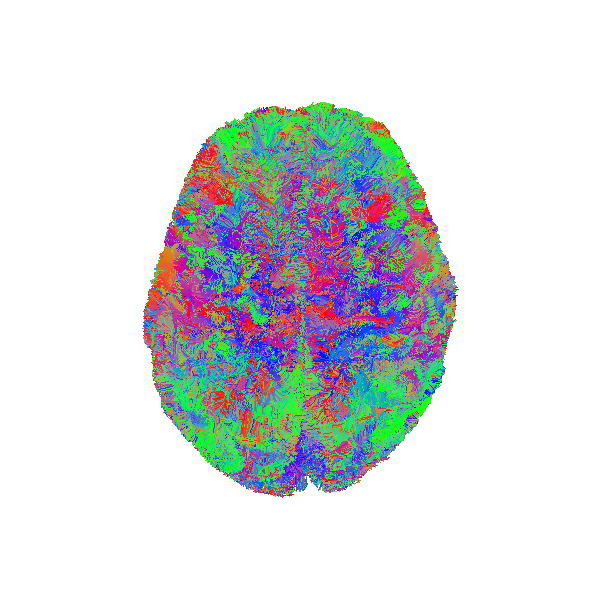
fast streamline search

Atlas bundle and source streamlines before registration.

Read Arcuate Fasciculus Left and Corticospinal Tract Left bundles from already fetched atlas data to use them as model bundle. Let’s visualize the Arcuate Fasciculus Left model bundle.

model_af_l_file, model_cst_l_file = get_two_hcp842_bundles()
sft_af_l = load_tractogram(model_af_l_file, "same", bbox_valid_check=False)
model_af_l = sft_af_l.streamlines

scene = window.Scene()
scene.SetBackground(1, 1, 1)
scene.add(actor.line(model_af_l, colors=(0, 1, 0)))
scene.set_camera(
    focal_point=(-18.17281532, -19.55606842, 6.92485857),
    position=(-360.11, -30.46, -40.44),
    view_up=(-0.03, 0.028, 0.89),
)
if interactive:
    window.show(scene)
else:
    window.record(scene=scene, out_path="AF_L_model_bundle.png", size=(600, 600))
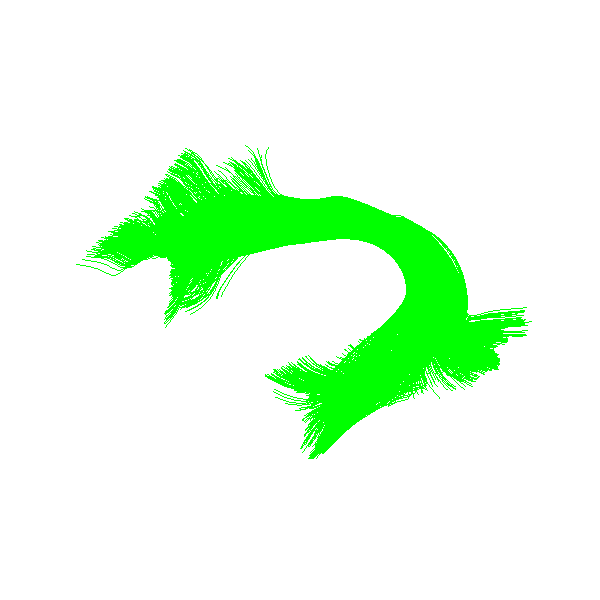
fast streamline search

Model Arcuate Fasciculus Left bundle

Search for all similar streamlines [1]

Fast Streamline Search can do a radius search to find all streamlines that are similar to from one tractogram to another. It returns the distance matrix mapping between both tractograms. The same list of streamlines can be given to recover the self distance matrix.

here are the FastStreamlinesSearch class need the following initialization arguments:

  • ref_streamlines : reference streamlines, that will be searched in (tree)

  • max_radius : is the maximum distance that can be used with radius search

Then, the radius_search() method needs the following arguments:

  • radius : for each streamline search find all similar ones in the “ref_streamlines” that are within the given radius

Be cautious, a large radius might result in a dense distance computation, requiring a large amount of time and memory. Recommended range of the radius is from 1 to 10 mm.

radius = 7.0
fs_tree_af = FastStreamlineSearch(ref_streamlines=model_af_l, max_radius=radius)
coo_mdist_mtx = fs_tree_af.radius_search(streamlines, radius=radius)

Extract indices of streamlines with an similar ones in the reference

ids_s = np.unique(coo_mdist_mtx.row)
ids_ref = np.unique(coo_mdist_mtx.col)

recognized_af_l = streamlines[ids_s].copy()

let’s visualize streamlines similar to the Arcuate Fasciculus Left bundle

scene = window.Scene()
scene.SetBackground(1, 1, 1)
scene.add(actor.line(recognized_af_l, colors=(0, 0, 1)))
scene.set_camera(
    focal_point=(-18.17281532, -19.55606842, 6.92485857),
    position=(-360.11, -30.46, -40.44),
    view_up=(-0.03, 0.028, 0.89),
)
if interactive:
    window.show(scene)
else:
    window.record(scene=scene, out_path="AF_L_recognized_bundle.png", size=(600, 600))
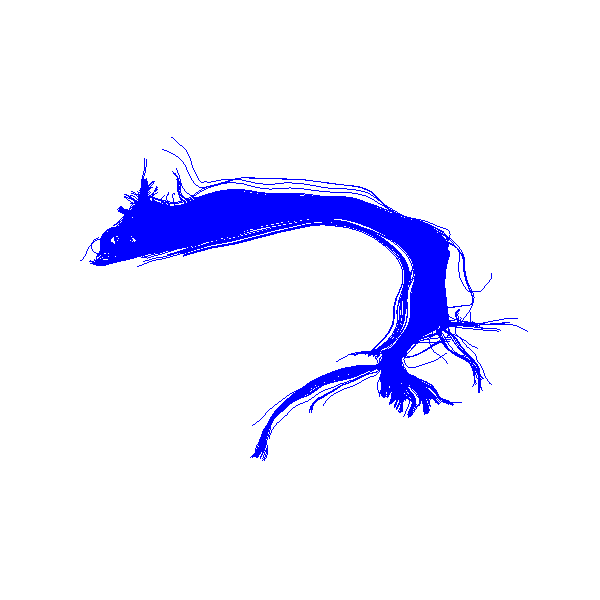
fast streamline search

Recognized Arcuate Fasciculus Left bundle

Color the resulting AF by the nearest streamlines distance

nn_s, nn_ref, nn_dist = nearest_from_matrix_row(coo_mdist_mtx)

scene = window.Scene()
scene.SetBackground(1, 1, 1)
cmap = actor.colormap_lookup_table(scale_range=(nn_dist.min(), nn_dist.max()))
scene.add(actor.line(recognized_af_l, colors=nn_dist, lookup_colormap=cmap))
scene.add(actor.scalar_bar(lookup_table=cmap, title="distance to atlas (mm)"))
scene.set_camera(
    focal_point=(-18.17281532, -19.55606842, 6.92485857),
    position=(-360.11, -30.46, -40.44),
    view_up=(-0.03, 0.028, 0.89),
)
if interactive:
    window.show(scene)
else:
    window.record(
        scene=scene, out_path="AF_L_recognized_bundle_dist.png", size=(600, 600)
    )
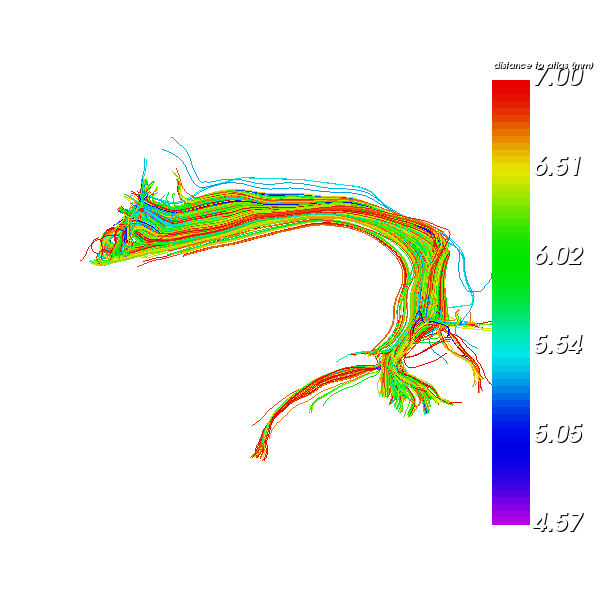
fast streamline search

Recognized Arcuate Fasciculus Left bundle colored by distance to ref

Display the streamlines reference reached in green

# Default red color
ref_color = np.zeros((len(model_af_l), 3), dtype=float)
ref_color[:] = (1.0, 0.0, 0.0)

# Reached in green color
ref_color[ids_ref] = (0.0, 1.0, 0.0)

scene = window.Scene()
scene.SetBackground(1, 1, 1)
scene.add(actor.line(model_af_l, colors=ref_color))
scene.set_camera(
    focal_point=(-18.17281532, -19.55606842, 6.92485857),
    position=(-360.11, -30.46, -40.44),
    view_up=(-0.03, 0.028, 0.89),
)

if interactive:
    window.show(scene)
else:
    window.record(
        scene=scene, out_path="AF_L_model_bundle_reached.png", size=(600, 600)
    )
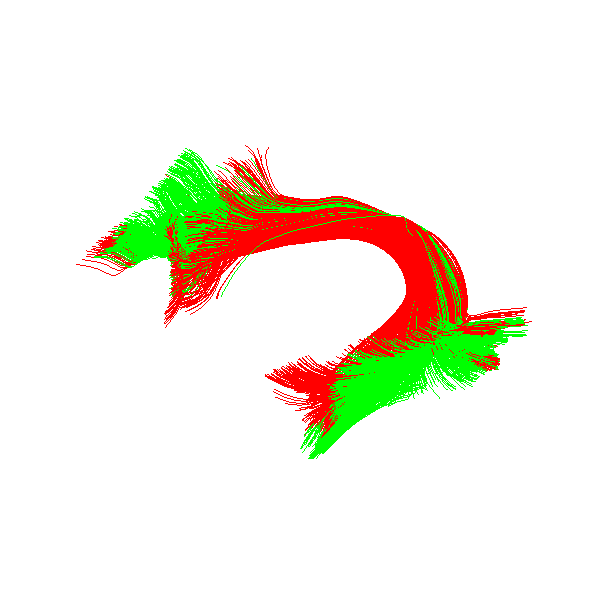
fast streamline search

Arcuate Fasciculus Left model reached (green) in radius

References#

[1] (1,2)

Etienne St-Onge, Eleftherios Garyfallidis, and D. Louis Collins. Fast Streamline Search: An Exact Technique for Diffusion MRI Tractography. Neuroinformatics, 20(4):1093–1104, 2022. URL: https://doi.org/10.1007/s12021-022-09590-7, doi:10.1007/s12021-022-09590-7.

Total running time of the script: (0 minutes 17.274 seconds)

Download Jupyter notebook: fast_streamline_search.ipynb

Download Python source code: fast_streamline_search.py

Download zipped: fast_streamline_search.zip

Gallery generated by Sphinx-Gallery

previous

Saving and Loading QuickBundles Clustering Results

next

Enhancing QuickBundles with different metrics and features

On this page
  • References

Never miss an update from us!

Don't worry! we are not going to spam you.

Subscribe
  • GitHub
  • Twitter/X
  • YouTube
  • LinkedIn
About
  • Developers
  • Support
  • Download
  • Get Started
  • Tutorials
  • Videos
Friends
  • Nipy Projects
  • FURY
  • Nibabel
  • Tortoise
Support
  • The department of Intelligent Systems Engineering of Indiana University
  • The National Institute of Biomedical Imaging and Bioengineering, NIH
  • The Gordon and Betty Moore Foundation and the Alfred P. Sloan Foundation, through the University of Washington eScience Institute Data Science Environment
  • Google supported DIPY through the Google Summer of Code Program (2015-2024)
Copyright 2008-2026,DIPY developers. Created using Grg Sphinx Theme and PyData Sphinx Theme.